.svg)
Last modified:
About the VCOM API
The VCOM API enables you to integrate VCOM data with other applications. Access to the VCOM API requires a valid VCOM user account and an API key. API keys are created at the Portfolio level and apply to all systems within that portfolio. The data accessible through the API depends on the permissions of the associated user account.
The API supports the exchange of data in text/JSON format (no images). Depending on the endpoint, data may be read‑only or allow creation and modification.
Target group
The VCOM API is intended for users and partners who want to integrate VCOM data into their own applications or workflows. Basic programming knowledge is required.
Detailed technical information, such as available endpoints, request parameters, authentication details, and response formats, is provided in the VCOM API documentation. To access the documentation via VCOM, go to the top bar and select 

Typical use cases
-
Export measured data to BI tools
-
Synchronize ticket data with service partners
-
Automate reporting across multiple portfolios
Rate limits
Each service level includes one API key with defined request limits. Additional API keys can be purchased if higher request volumes are required. To activate the key, see Set up the VCOM API.
|
API plan |
Partner level |
Calls per minute |
Calls per day |
|---|---|---|---|
|
API 500 |
Basic |
30 |
500 |
|
API 10 000 |
Professional |
90 |
10 000 |
|
API 100 000 |
Premium |
270 |
100 000 |
|
API 150 000 |
Contact Sales |
360 |
150 000 |
Security and usage notes
-
We recommend setting up a separate, dedicated user account for API access to enhance security and facilitate tracking.
-
You can also create a user-defined group for this ( PREMIUM PARTNERS ).
-
-
Store credentials and API keys securely.
-
You can only block single users from accessing the API by deleting the account.
-
If an API key is compromised, invalidate it and create a new one.
-
Monitor your API usage to stay within plan limits.
-
JSON format is the default for all endpoints.
-
Implement proper error handling in your code.
Note
We do not provide support for creating API queries, programming scripts, or troubleshooting issues relating to third-party APIs.
Set up the VCOM API
Prerequisites
-
You are an existing VCOM partner.
-
User group administrator
Steps
-
In VCOM at the portfolio level , go to
.png?cb=12102cf9ad8b8bc5c973d4c89009819a)

-
If you do not already have an API key, enter a description of your API.
-
Select the API plan that applies to you. This refers to the number of API calls/requests you are permitted per day.
-
Select

The table will display the details for each key you have purchased. You can now use the API keys, for example, for authentication.
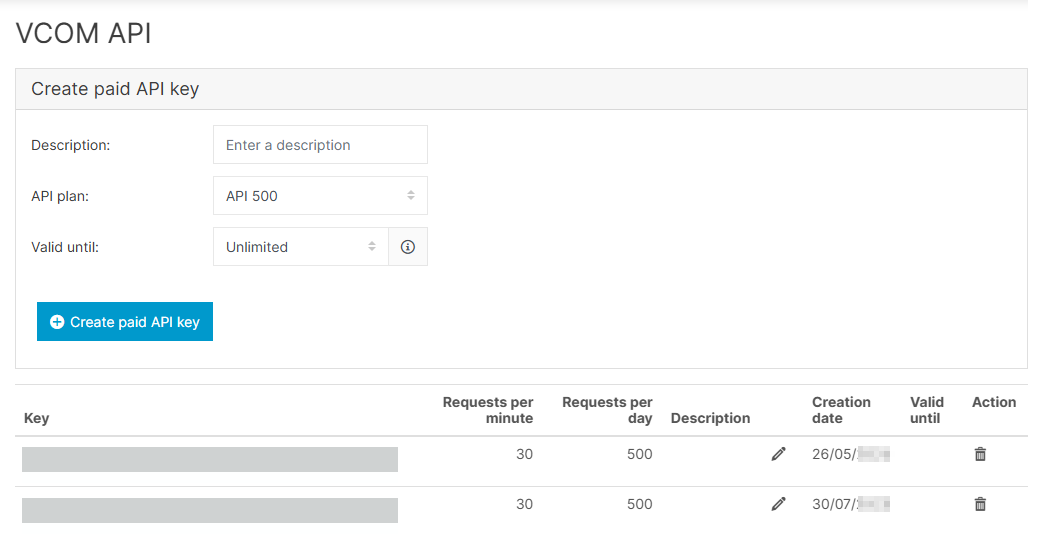
Further actions
-
Upgrade an existing API key: Contact Sales: sales@meteocontrol.com
-
Purchase additional API keys: Select your desired API plan and select Create paid API key. Additional API keys are billed with your quarterly VCOM statement.
-
Invalidate an API key: In the Action column, select

Locate your VCOM API key
Prerequisites
-
You have already set up the VCOM API.
Steps
-
In VCOM at the portfolio level , go to
-
In the table of API keys, locate the relevant API key.
-
Copy the API key.
You can now use the key.