.svg)
Last modified:
If at least one battery is available in your system, you can set up an alarm to notify you if the battery’s state of charge (SOC) falls below or exceeds the tolerated range. Moving outside of the range can negatively impact the lifespan of the battery. The range is generally defined in the manufacturer’s documentation. For battery alarms, you can set the alarm severity and delay.
Example
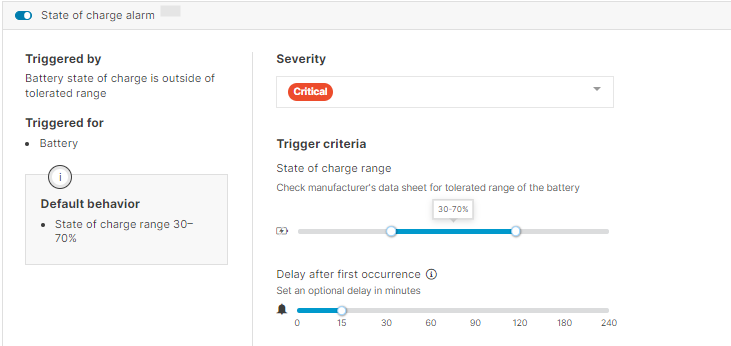
Based on the settings in the screenshot below:
-
A critical alarm will be triggered if the state of charge falls below 30% or exceeds 70%.
-
The alarm will only be triggered if the incident persists beyond 15 minutes.
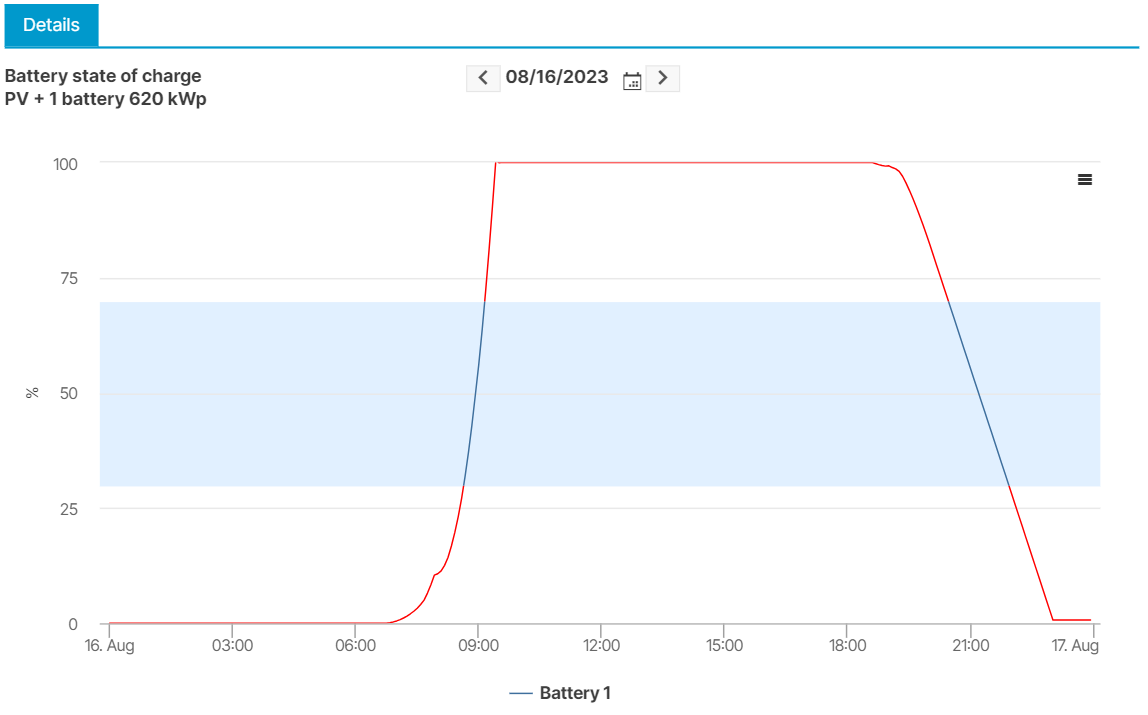
Once the alarm is set up, you can view the state of charge as a chart in the Alarms portlet.
Example
In the example below, the red line reflects the period during which the state of charge is outside the tolerated range (between 10 AM and 2 PM).