VCOM Cloud

Data outage alarms

Last modified:

About data outage alarms

Data outage alarms are generated if data loggers are communicating with VCOM, but no data is being imported from a specific device. As with other alarms, you can choose the monitoring period and a delay.

The following graphic illustrates a typical communication scenario between the data logger and VCOM in which two devices (dotted lines) are not sending data to the data logger in the bus communication. In this case, two different data outage alarms will be generated for the respective devices. These alarms will be displayed in the Alarms portlet.
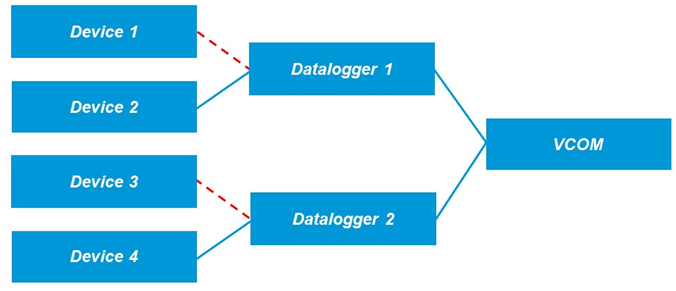

Scenario in which two data outage alarms are generated
📗

Example

Based on the settings in the screenshot below:

  • No custom alarm profiles are used.

  • The monitoring period begins 30 minutes after sunrise and ends 30 minutes before sunset.

  • A critical alarm is triggered if no system or inverter data is being imported for 30 minutes or more.

  • A high alarm is triggered if no meter data is being imported for 30 minutes or more.

  • A normal alarm is triggered for any other device.
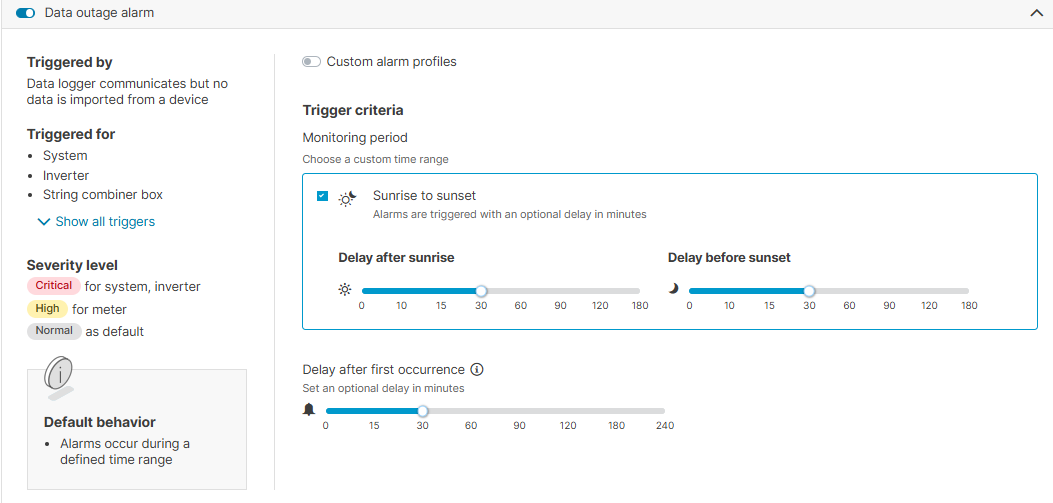
Data outage alarm settings

Custom alarm profiles

Learn about custom alarm profiles

Custom alarm profiles allow you to define how alarms behave for different component types and alarm categories in your system. With a custom alarm profile, you can:

  • Create more granular alarms for total outage, misproduction, and data outage alarms.

  • Enable or disable smart alarms per component type (= alarm level), for example, inverters, meters, string combiner boxes, sensors, and batteries. You can also consider the entire system as a component.

  • Total outage and misproduction alarms: Select a different severity, trigger criteria, and simulation method per alarm level.

  • See only relevant alarm levels (up to nine), depending on available components. For example, you cannot configure tracker or battery alarms if these components are not installed in your system.

When a component type is disabled in a custom alarm profile, all related alarms are suppressed. This avoids muting individual devices and ensures alarms are triggered only where monitoring is needed.

To use this feature, activate the toggle Custom alarm profiles under the respective alarm.