.svg)
Last modified:
About total outage alarms
Total outage alarms reflect a total outage of an inverter, a string combiner box, or the entire system. An alarm is triggered when the actual (measured) power drops below 1% of the nominal power.
Parameters
-
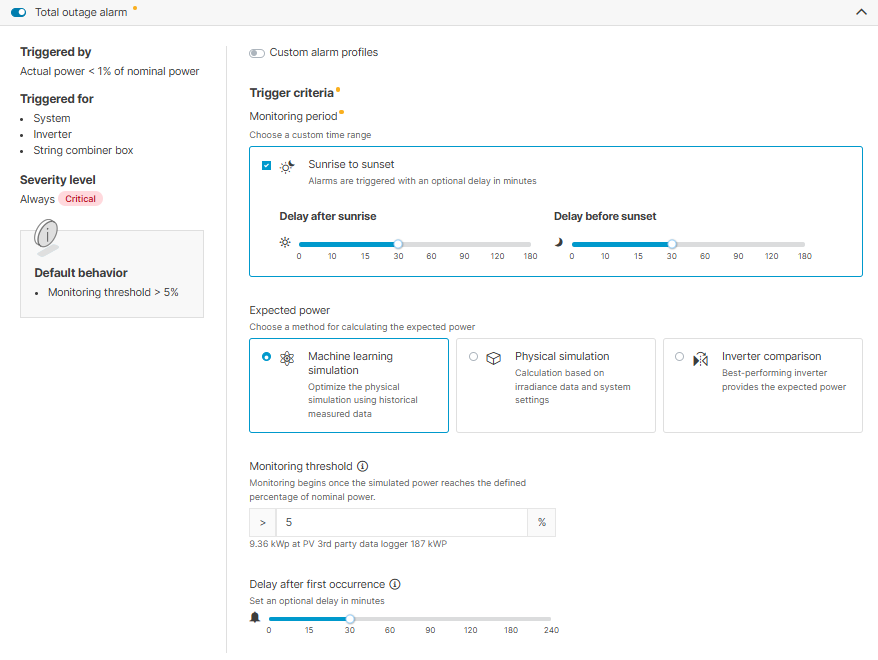
Monitoring period: To restrict alarms to daylight hours, tick the check box Sunrise to sunset and configure a delay if desired. If the incident occurs outside the defined time range, the alarm will be triggered once your defined time range begins.
-
Expected power: See Calculation methods for total outage and misproduction alarms.
-
Monitoring threshold: Monitoring begins once the expected power reaches the defined percentage of nominal power (= manufacturer's indication of the system's power output under normal conditions).
Example
For example, with a 100 kW system and a threshold set to 7.5%, the alarm is only triggered if the expected power exceeds 7.5 kW and the other trigger criteria are met.
-
Delay after first occurrence: If you configure a delay, an alarm will only be triggered in case of persistent incidents. This helps to avoid alarms for deviations that only occur for a short time.
Example
Based on the settings in the screenshot below:
-
No custom alarm profiles are used.
-
The monitoring period begins 30 minutes after sunrise and ends 30 minutes before sunset.
-
The machine learning simulation calculates the expected power.
-
When the monitoring threshold of 5% is exceeded, a critical alarm will be triggered if the outage persists beyond 30 minutes.
Custom alarm profiles
Note
If you have selected a method that does not produce a value, and all your inverters fail simultaneously, a basic default calculation based on the sun's position will be performed. This calculation simply checks if power should be available, without considering the configured nominal power value.