.svg)
Last modified:
After setting up a battery subsystem, VCOM is able to differentiate between your system’s PV and battery inverters.
Prerequisites
-
A basic system with site data already exists.
-
You have activated VCOM Battery Monitoring for the specific system. See Activate VCOM Battery Monitoring. If your site only has an uninterruptible power supply (UPS, overall capacity < 30 kWh), you can proceed without activating the module.
Steps
-
At system level , go to


-
In the area Subsystems, select

-
A window with a step-by-step wizard appears.
-
Follow the steps of the wizard.
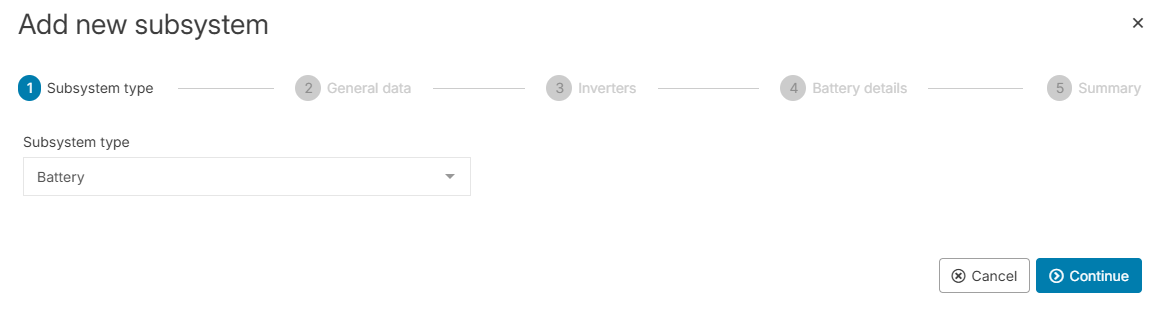
(1) Subsystem type
-
From the Subsystem type dropdown, select Battery. The type refers to the inverter category used in the entire subsystem.
(2) General data
-
Enter a Title for your subsystem.
Recommendation
Take notice of our Naming guideline when giving names and titles.
-
Enter the Date of installation of your subsystem.
-
If you use a tracking system (solar tracker), select the type under Trackers. Otherwise, select No Trackers.
(3) Inverters
Note
Each subsystem can only have one type of inverter, but it can have multiple inverters of the same type.
-
Select the Inverter manufacturer of all the inverters you want to specify with this subsystem. If you can not find the desired manufacturer, send a request to technics@meteocontrol.com including the manufacturer’s website or data sheet. We will get back to you with any further questions or let you know if we added it to the list.
-
When a manufacturer is selected, you can select the Inverter type. If you can not find your inverter type in the list, select
-
For the specific subsystem, enter the Number of inverters of the respective manufacturer and of the type you just specified.
(4) Battery details
All busbars are listed in the sidebar of the wizard. Go through each busbar and enter the specifications:
Note
The specifications for your busbars apply to all inverters of your subsystem.
-
Select if the busbar is Allocated or Not allocated.
-
Under Capacity, enter the rated capacity at the beginning of the life of your battery.
-
Proceed as described with all the other busbars in the sidebar. Depending on the number of inverters in this subsystem or battery capacities already specified in other subsystems, the battery capacity of this subsystem and of the entire system is calculated. If you exceed the limit of 30 kWh and you can not save the subsystem later, check the prerequisites again.
(5) Summary
-
Check the battery details in the summary:
-
Total capacity of your battery subsystem, which is calculated based on the sum of the capacities of all allocated busbars and the number of inverters. Sometimes the calculated number deviates from the predefined rated capacity of the battery.
-
The battery subsystem now appears in the Battery section of the Subsystems area. At system level in the Evaluation tab, the new section Battery storage appears. The default tab Battery is added to your system-level tabs.
Further actions
-
Set up more subsystems in the same manner until you have specified all your system’s inverters, modules, or batteries.
-
Select


-
VCOM BATTERY MONITORING ONLY Assign a battery unit to a PCS