
Last modified:
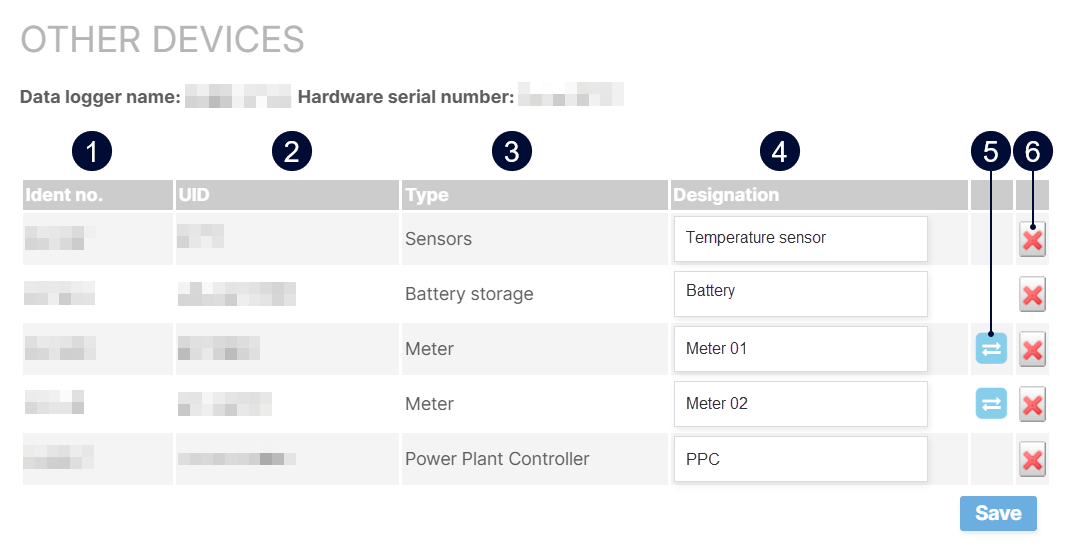
In the Other devices overview, view all additional external devices connected to your system (e.g. via data logger), such as meters, sensors, batteries and their devices, status signals, or power plant controllers. If desired, replace or delete devices here.
At system level , go to 

|
Name |
Details |
|
|---|---|---|
|
1 |
Ident no. |
The Ident no. of a device is automatically assgined by VCOM. it is read-only and can not be changed. |
|
2 |
UID |
Device identifier during data import. |
|
3 |
Type |
Type of sensor or status signal. |
|
4 |
Designation |
The designation is the name of your device. It is automatically assigned based on the information from the data logger. You can edit the inverter name here. BLUELOG ONLY If using a bluelog Neo or blue’Log XM/XC, you can only edit the name via the bluelog web interface. |
|
5 |
|
This function replaces a device or status signal with a new one. This process will delete the old device and transfer its Ident no. to the new device. Example You have exchanged a physical sensor on-site and now need to update VCOM as well. |
|
6 |
|
This function removes a device completely. Warning Use this function with caution as data may be lost irreversibly. If you have any questions, please contact Technical support. |

