
Last modified:
Overview
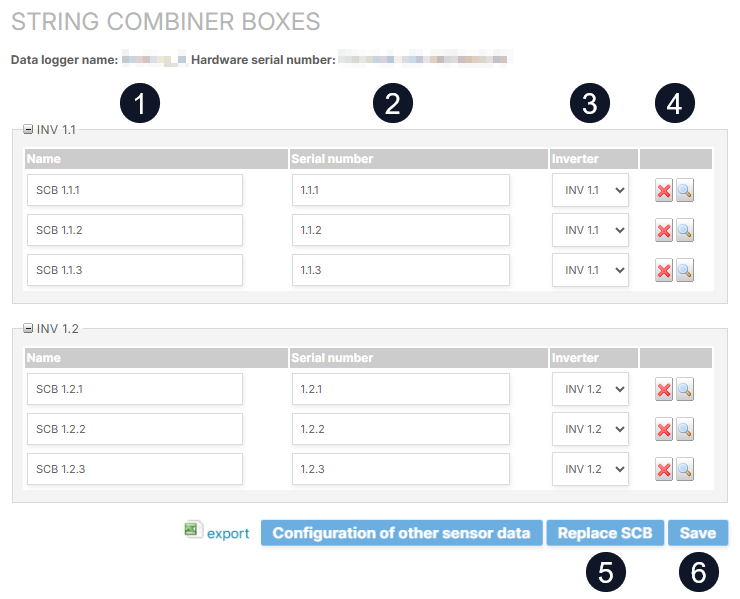
View and edit the string combiner boxes of your system at the SYSTEM LEVEL under 
|
Name |
Details |
|
|---|---|---|
|
1 |
Name |
Edit the name of each SCB. Save your changes. |
|
2 |
Serial number |
SCBs serial number. |
|
3 |
Inverter |
Assign each SCB to the inverter to which it is connected. |
|
4 |
Actions |
|
|
5 |
Replace SCB |
Replace an old SCB with a new one. Carry out the on-site replacement before saving it here on the configuration page. So that the new SCB appears in the list of replaceable SCBs. |
|
6 |
Save |
Save all your changes. |

Configure the strings of your SCBs for string alarms
Prerequisites
-
User group technical customer or higher
Steps
-
At SYSTEM LEVEL , go to
-
For each SCB, select

-
Verify that an appropriate Scale factor is used.
-
Verify that the checkbox for Active is ticked for the strings that should be operational.
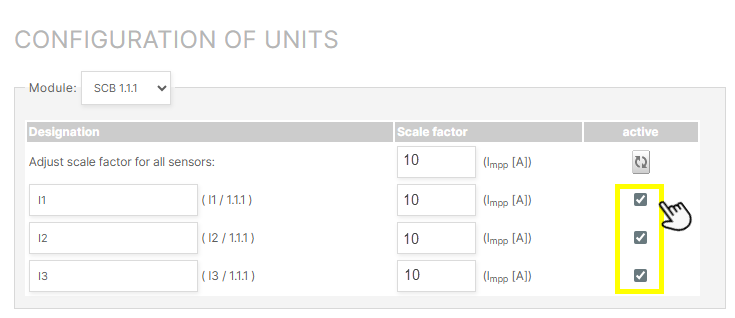
The strings of your SCBs are now ready to be monitored with string alarms. See String alarms.