.svg)
Last modified:
Overview
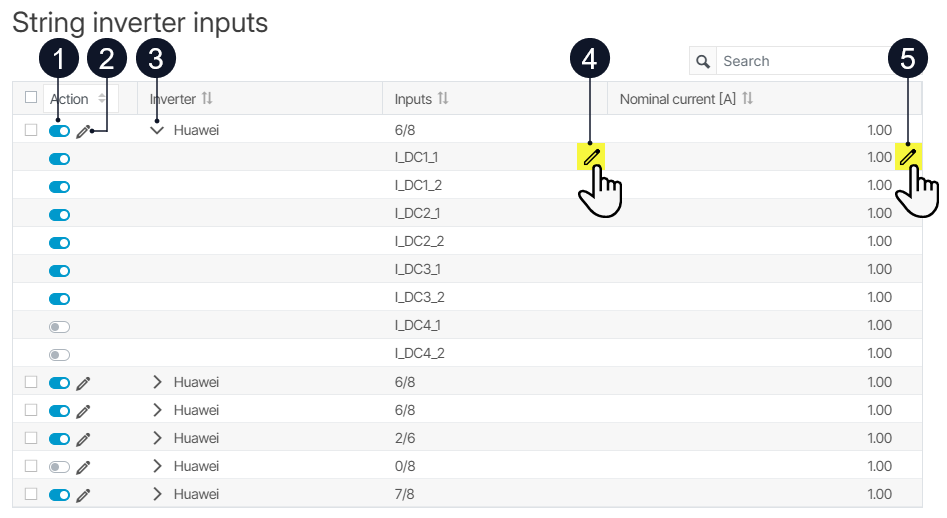
You can find an overview of all your string inverters' inputs at system level , under 

|
Name |
Details |
|
|---|---|---|
|
1 |
Activity status and Activate / Deactivate action |
See also Manually update the activity status of string inverter inputs. |
|
2 |
Edit nominal current (multiple) |
Edit the nominal currents for all inputs of an inverter. |
|
3 |
|
Expand the view for a string inverter to see all its inputs. |
|
4 |
Edit input name |
Hover over a single input name to see this action. Edit the name of an input. It will change in the evaluation charts and reports. |
|
5 |
Edit nominal current (single) |
Hover over a single nominal current to see this action. Edit the nominal current of a single input. |

Updating activity status
The activity status indicates whether a string inverter input is considered active and should be included in data import, monitoring, and smart alarms.
Depending on your use case, you can update the activity status manually or automatically.
Manually update the activity status of string inverter inputs
Manually deactivate strings (temporarily) when they are intentionally out of service, for example, due to maintenance work, on-site modifications, or a known fault. The data of those strings is not imported into the portal anymore to ensure that evaluations are based only on strings that are expected to be operational and to prevent false String alarms.
Prerequisites
-
User group technician or higher
Steps
-
At system level , go to

-
Use the toggle


-
For a single input:

-
For all inputs of a string inverter: Use the toggle for the entire string inverter. All associated inputs are updated accordingly.
-
For all inputs of multiple string inverters: Use the checkboxes and the Action dropdown.
-
The activity statuses of the respective inputs are now updated. Only active inputs are included in data import, monitoring, and smart alarms.
Automatically update the activity status of string inverter inputs
The automatic update helps to reduce configuration effort by activating and deactivating inputs based on their measured DC current. It is particularly useful after importing new string inverters, as their inputs are initially inactive.
The automatic update evaluates DC current measurements as follows:
-
For newly imported string inverters, the currently measured DC current is evaluated.
-
For existing string inverters, DC current measurements from the previous day between 11:00 AM and 1:00 PM are evaluated.
To ensure reliable results, perform the automatic update during daylight and under normal operating conditions.
-
If a DC current > 0.2 A is measured, the input is activated automatically.
-
If only DC currents < 0.2 A are measured, the input is deactivated automatically.
Caution
The automatic status update always overwrites previously set statuses.
The automatic update does not apply to strings of string combiner boxes.
Prerequisites
-
User group technical customer or higher
Steps
-
At system level , go to
-
Select

The activity status of all your system’s string inverter inputs is now updated according to the validation rules. Only active inputs are included in data import, monitoring, and smart alarms.
Further actions
-
Check the results of the automatic status update or set the status of the inputs manually. See Manually update the activity status of string inverter inputs.