.svg)
Last modified:
Technical support
There are several ways you can request support:
-
meteocontrol website: Support - meteocontrol GmbH
-
Telephone: +49 821 34666 44
-
Email: technics@meteocontrol.com
-
Directly In VCOM. See Send a support request directly from VCOM.
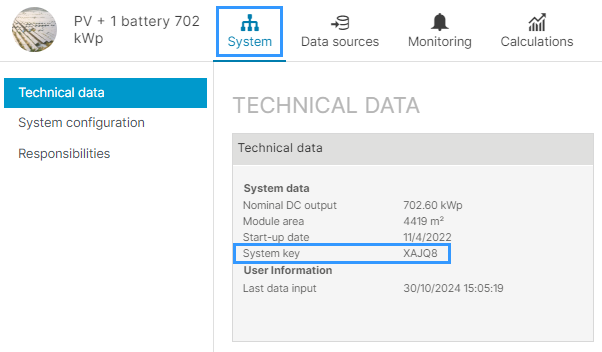
When you contact technical support, you will probably be asked to provide your VCOM System key, a 5-character alphanumeric code that can be found in VCOM at the system level > 

Send a support request directly from VCOM
With the VCOM feature Support request you can create a support request directly from VCOM. Important information for our support, such as your customer data and the system key, is automatically transferred. As usual, you will receive a confirmation of receipt by e-mail for every support request you have created and, if necessary, you can also provide our support teams with further information.
Prerequisites
-
None
Steps
-
Log into the VCOM Cloud with your access data and select


-
Fill out the support form, providing the following information:
-
A meaningful subject
-
A detailed description of the request
-
A screenshot that shows the problem
-
-
If you are already in a corresponding system level (system's Cockpit), this is automatically pre-selected.
-
If you are in the portfolio level (Control center), select the relevant system using the drop-down field. This field can also be left blank if the request does not relate to a specific system.
Training
meteocontrol offers training courses for customers on a continuous basis. Please visit the following website for more information: Training.