.svg)
Last modified:
With user-defined static alarms, you can monitor single data points for your devices. See also Available data points and categories.
For example, you can detect a deviation from a defined measured value, such as inverter frequency on individual devices. For this, threshold values are defined (maximum, minimum, or permissible range). This alarm is triggered if the monitored data point exceeds or falls below the threshold value. You define the device type, criteria, and delay for generating each specific user-defined static alarm.
Set up a user-defined static alarm
Prerequisites
-
At least one device is connected to your system.
Steps
-
At SYSTEM LEVEL , select the

.png?cb=d435b4518396a52d9b529945e33f1e49)
-
Select New measurement alarm > Static alarm > Create.
-
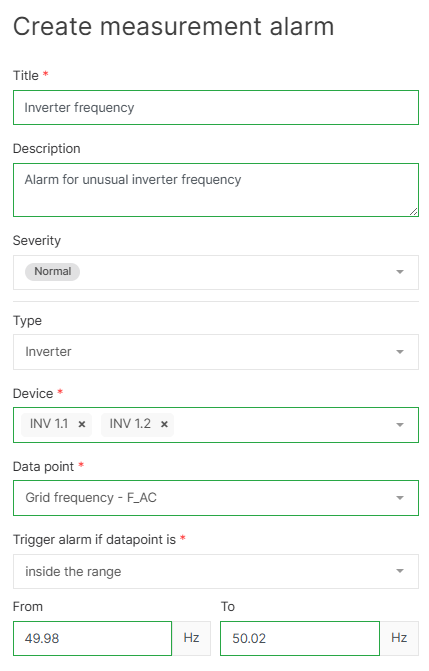
Give the alarm a title and (optional) description, and assign a severity.
-
Under Type, select a device type.
-
Alternatively, select Sensoric/Calculated to use values calculated using Terms.
-
The additional settings that appear will depend on the values you wish to monitor.
-
-
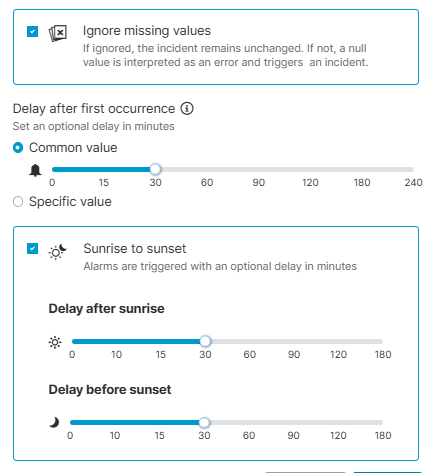
Tick the check box Ignore missing values to avoid triggering alarms if the measurement value is null.
-
Configure a Delay after the first occurrence.
-
Tick the check box Sunrise to sunset to trigger alarms only between sunrise and sunset. To provide a tolerance, adjust the slider to the desired number of minutes before sunrise and after sunset.
-
Select

The alarm will appear in the User-defined alarms overview.
Example
Based on the settings in the screenshots below:
-
An alarm with the severity “normal” will be triggered if the inverter frequency on Inverter 1.1 or Inverter 1.2 is outside the range of 49.98-50.02 Hz.
-
Null values will not be considered for the alarm.
-
The alarm will only be triggered between sunrise and sunset if the incident persists beyond 30 minutes.