
Last modified:
Manage user-defined alarms at system level or in a combined overview at PORTFOLIO LEVEL .
Overview of all user-defined alarms of a system
Prerequisites
-
User group technician or higher
Steps
-
At system level , go to


Overview of all user-defined alarms in your portfolio
Prerequisites
-
User group technician or higher
Steps
-
At PORTFOLIO LEVEL , go to


Further actions
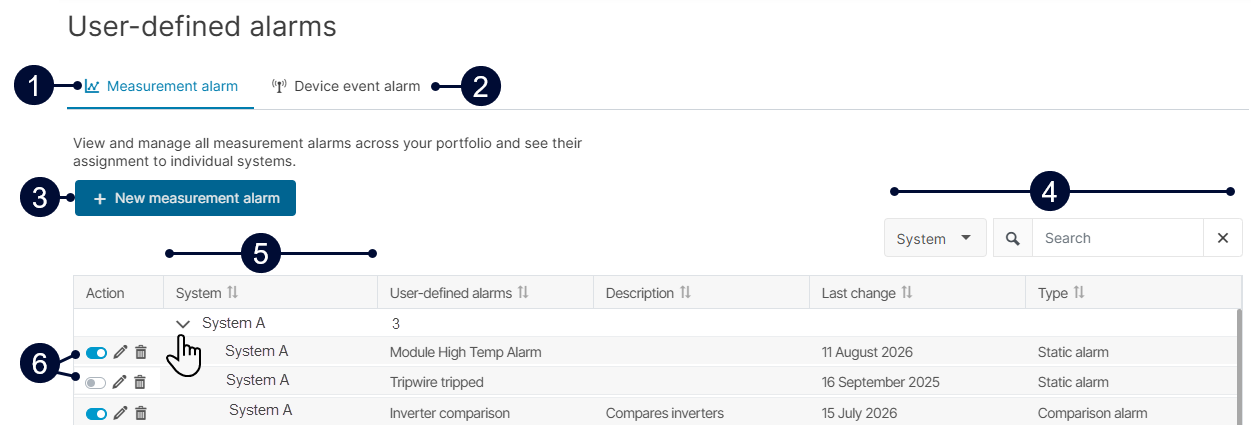
|
Name |
Description |
|
|---|---|---|
|
1 |
Measurement alarm |
Manage all measurement alarms in this tab. See User-defined comparison alarms and User-defined static alarms. |
|
2 |
Device event alarm |
Manage all device event alarms in this tab. |
|
3 |
+ New (measurement) alarm |
Create a new user-defined alarm of the respective type. |
|
4 |
Search and filter |
Search the alarm list and filter by certain criteria. |
|
5 |
System |
List of all systems in your portfolio.
|
|
6 |
Action |
Actions affect all users with access to the respective system:
|


