.svg)
Last modified:
Basic info
|
Item in the Portlet center |
|
|---|---|
|
Description |
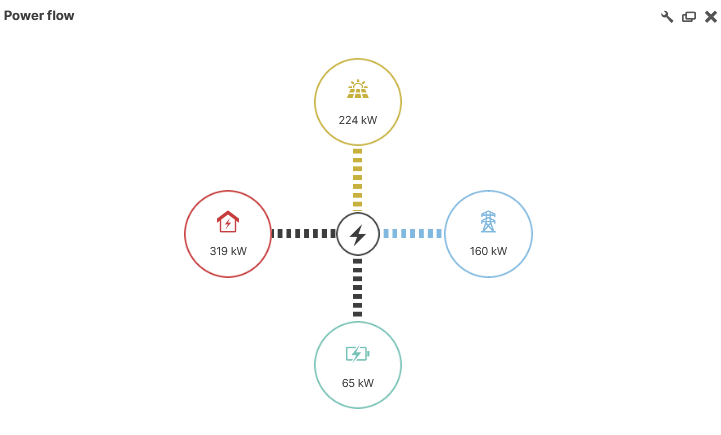
The Power flow portlet displays the real-time power flow and direction between your system’s energy nodes, such as PV generation, grid, consumption, and batteries. |
|
Prerequisites |
|
|
Portlet properties |
System portlet: The portlet can be added at the SYSTEM LEVEL . Dynamic portlet: The portlet is updated when you select a different system name from the systems list. |
|
Further details |
Data sources for energy nodes Configure each energy node’s data source at system level under
Terms The terms used for this portlet are, by default, the following:
During portlet configuration, the following terms are newly created:
|
Overview of the portlet
Troubleshooting
Problem
Grid flow directions are reversed.
Cause
The “reference arrow direction” on your data logger or meter has been incorrectly configured. This causes the power transformer to reverse the values for grid import and export and results in an incorrect power flow portlet.
Solution
-
At system level , go to


-
In the table of terms, navigate to the term Power flow grid [PF_P_GRID] and select

-
Change the Formula: Add parenthesis and a minus
-(…)around the formula. -
Select

The values are reversed now and the grid flow direction in the power flow portlet is corrected.
Note
Alternatively, correct the configuration on your data logger or meter, or ensure the power transformer is connected properly. blue'log only If using a blue’Log, see https://help-center.meteocontrol.com/blue-log-xm-xc/?contextKey=meters&version=latest&language=en for correcting these configurations.
Note that the historical data will still be incorrect in this case.