.svg)
Last modified:
Basic info
|
Item in the Portlet center |

|
|---|---|
|
Description |
You can display your CO2 compensation values at the portfolio level or system level . |
|
Prerequisites |
|
|
Portlet type |
Portfolio portlet: The portlet can be added at the Portfolio Level . System portlet: The portlet can be added at the SYSTEM LEVEL . Dynamic portlet: The portlet is updated when you select a different system name from the systems list. |
|
Further details |
By default, VCOM applies an emission factor for the country in which the system is located. The value is based on this database: Our World in Data. If no country-specific value is available, the global average is applied. You can configure a different value if desired. |
Formula
If, for example, the emission factor is 0.596, the values are calculated as follows:
CO2 savings = 0.596 * generated kWh
This means the kWh generated by your entire portfolio or system to date.
Planted trees = CO2 savings in kg / 10.55
10.55 kg CO2 savings are equivalent to one tree.
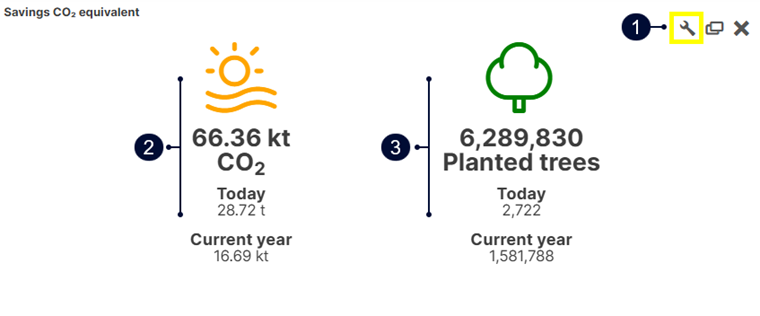
Overview of the portlet
|
Name |
Description |
|
|---|---|---|
|
1 |
|
View or edit the CO2 factor. |
|
2 |
CO2 savings |
Current CO2 savings from today and the current year-to-date. |
|
3 |
Planted trees |
CO2 savings measured in planted trees from today and the current year to date. |
Note
Find further information on the general functions of a portlet under Portlets.
Set up the Savings CO2 equivalent portlet
Prerequisites
-
At least one system is set up.
Steps
-
At either the SYSTEM LEVEL or PORTFOLIO LEVEL , go to the

-
Add the Savings CO2 equivalent portlet.
-
In the portlet, go to the

-
The default value corresponds to the country where the system is located. To use a different value, select User-defined and enter the desired value.
-
Select

The values are now calculated in the portlet. The changes affect all users of the system.