.svg)
Last modified:
Basic info
|
Item in the Portlet center |
|
|---|---|
|
Description |
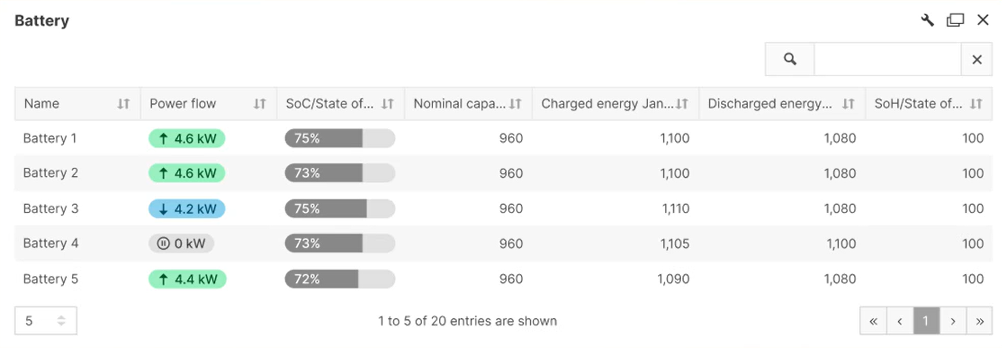
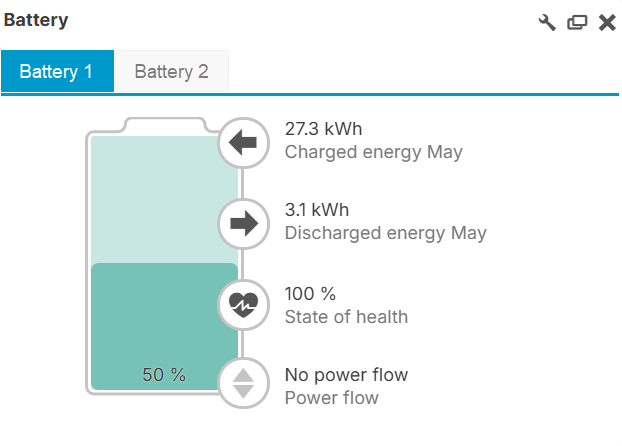
The battery portlet displays the following information about your system’s batteries:
|
|
Prerequisites |
|
|
Portlet properties |
Dynamic portlet: The portlet is updated when you select a different system name from the systems list. System portlet: The portlet can be added at the SYSTEM LEVEL . |
|
Further details |
Customize the displayed information and the portlet’s view through the To change the batteries' charging direction, see Change battery charging direction. |
Overview of the portlet
Note
Find further information on the general functions of a portlet on Portlets.
Troubleshooting
Problem
For the Power flow, the Charged energy, and Discharged energy, the respective power flow directions are reversed.
Cause
Your battery interprets negative and positive power values differently than the portal does.
Solution
Change the battery power flow directions for your batteries.
Prerequisites
-
User group technician or higher
Steps
-
At system level , go to


-
Select an option for how to interpret the power values of all your system’s batteries:
-
Default: Negative power values are interpreted as the battery being charged, and positive values as battery discharging.
-
Reverse: Negative power values are interpreted as the battery being discharged, and positive values as battery charging.
-
Note
Even if you use user-defined terms for battery charging and discharging, you can change the charging direction in the menu. The basic structure of your term formulas remains the same.
-
Select

The values are corrected now.