.svg)
Last modified:
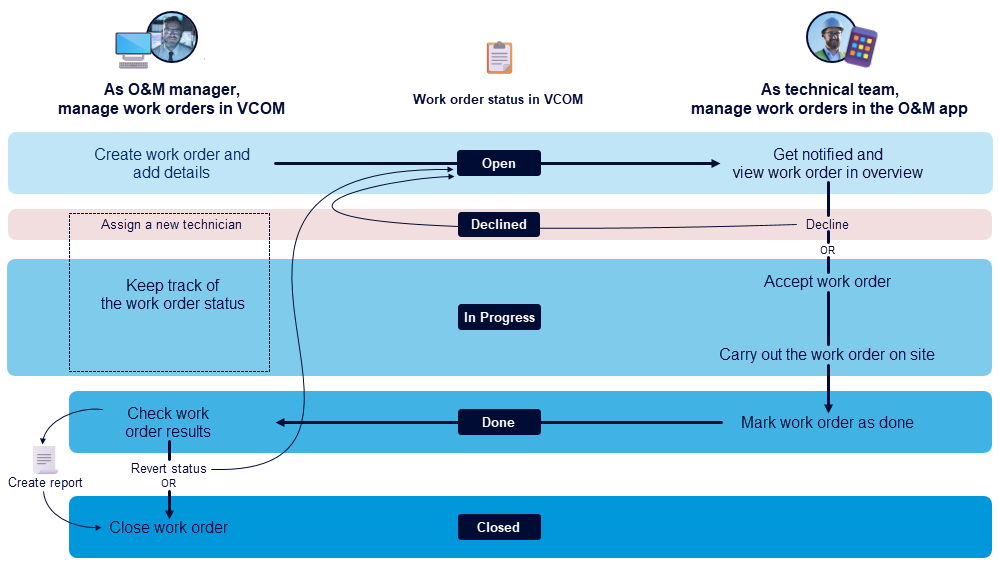
As an O&M manager, you manage all work orders in VCOM:
-
Create work orders directly from a ticket, add details and forms, and assign technicians to carry out the work on-site.
-
Check the technicians' work results, create reports, and close the finished work orders or revert their status if the technician needs to rework some issues.
-
Find an overview of the whole workflow on the left side of the figure below. See also Work orders in VCOM.
As a technician or technical team, you manage all work orders in meteocontrol’s O&M app:
-
The app provides an overview of all your assigned work orders, which you can then decline or accept.
-
Carry out the accepted work orders on-site, filling out necessary forms and checklists directly in the app.
-
Submit all results of completed work orders directly to VCOM.
-
Find an overview of the whole workflow on the right side of the figure below. See also Work orders in the O&M app.