.svg)
Last modified:
SCADA Interface
blue’Log XM/XC
Item no. 557.009
Access to live values via Modbus TCP.

Description
The SCADA interface is an open Modbus TCP interface. It provides external systems like SCADA or building management with simple and standardized access to all live measurement data of devices connected to the blue’Log.
No matter which communication protocol the connected device uses to communicate with blue’Log, the data can always be requested from the data logger by using the same Modbus protocol and register structure.
Features
-
Modbus TCP interface
-
Standardized access to live measurement data
-
The respective Modbus SCADA address (Slave ID) for the connected devices can be freely configured if required
-
Access to all measured data which the data logger records from the connected devices
-
Available device types: Inverter, Sensor, Meter, String monitoring, Status DI internal/external, Digital output, Tracker, Genset, Battery
Requirements
-
blue’Log XM/XC
-
557.009 SCADA Interface blue’Log XM/XC license. The license is issued for a specific blue’Log XM/XC. When ordering, provide the 14-digit hardware serial number of your data logger.
Available measured data
-
Depends on the connected device.
-
Available measured data are described in the Compatibility check.1)
-
Measured data that is not available will be transmitted as a "missing value". See table "Data types" in the section "Modbus specification" below.
1) A list of measured values is not available for every device. This depends on whether the available measured values are transmitted dynamically by the device, for example SunSpec devices.
Function assignment SCADA addresses (Slave ID)
-
The SCADA addresses (Slave ID) will be automatically assigned the first time the SCADA interface is activated.
-
The SCADA addresses are not reassigned if the SCADA interface is deactivated and then reactivated.
-
If the SCADA interface is activated, new added devices are not automatically assigned to a SCADA address.
-
The Reset SCADA address function reassigns the SCADA addresses for the existing devices.
-
The SCADA addresses of a device can be changed manually at any time.
Modbus specification
Communication parameters
-
SCADA address (Client ID): see Plant > SCADA interface > column SCADA address
-
Port: 502 or 503
-
To avoid a high load on the blue'Log, the number of polls per second should be limited to 1 poll per second (delay = 1,000 ms)
General register definition
-
If a device does not deliver a measured value, a missing value will be sent instead. See table “Data types” below.
-
Missing values int: 0x80000000 | float: 0x7FC00000
-
-
Read values: Function code 03 - Read holding registers
-
Write values: Function code 16 - Preset multiple registers
-
Register and byte order:
-
The word order is LOW register before HIGH register (Little Endian)
-
The byte order is HIGH byte before LOW byte (Big Endian) → 0xCCDDAABB
-
-
Every device has a type-dependent value set.
-
Regardless of the device type, the section "General values" in the SCADA interface register contains basic values such as device type, manufacturer, and device name.
-
Factor and offset: First the factor and then the offset must be calculated with the value.
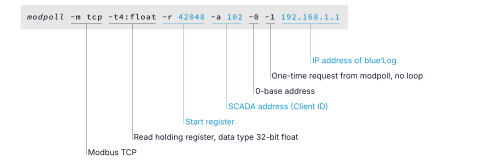
Example
Request for a temperature value (register 42048) of a sensor (SCADA address 102) at a blue’Log with IP 192.168.1.1.
Built with the open source tool modpoll.
Data types
|
Abbreviation |
Description |
Missing values |
|
U16 |
16-bit unsigned integer |
0xFFFF |
|
U32 |
32-bit unsigned integer |
0xFFFFFFFF |
|
I16 |
16-bit signed integer |
0x8000 |
|
I32 |
32-bit signed integer |
0x80000000 |
|
F32 |
32-bit float |
0x7FC00000 |
|
String |
|
0x00 |
Interface registers
This PDF provides an overview of the SCADA Interface registers (available in English only):
557009-SCADA-interface_en_2026-05-29.pdf