.svg)
Last modified:
Under Power control > Active power, you can configure parameters related to active power control. The user interface is divided into 4 main sections, as described below.
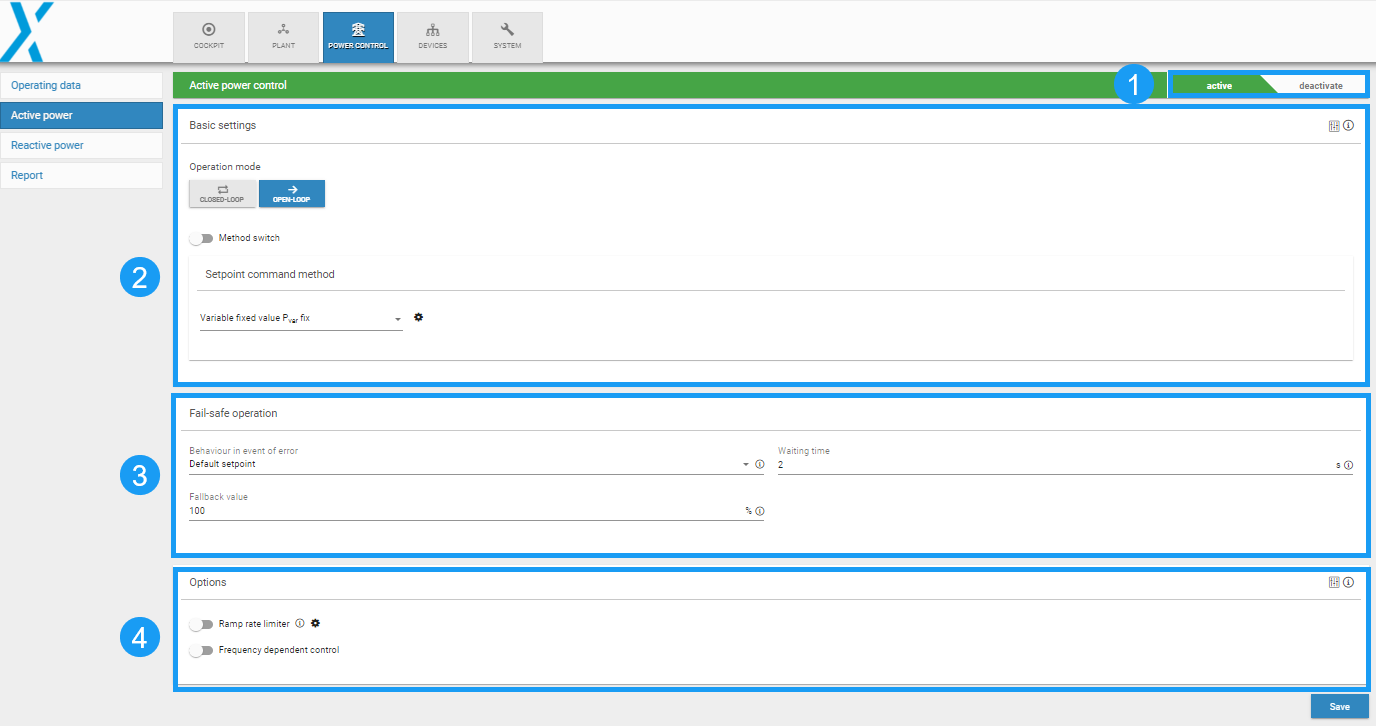
1. Power control toggle
Caution
Activate the Power Control toggle at the top of the Active power and Reactive power pages ONLY after you have fully configured your power control setup.

2. Basic settings
Operation mode
Method switch
-
Configure method switch via digital input or Modbus
Setpoint command method
The blue’Log provides the following setpoint command methods:
|
Method |
Description |
|---|---|
|
Variable fixed value Pvar fix |
A fixed value is defined as the default |
|
Variable fixed value Pvar Modbus |
An external controller sends the specification to the blue’Log via Modbus TCP |
|
Variable fixed value Pvar AI |
The specification depends on an analog signal (0-20mA) |
|
Variable fixed value Pvar DI |
The specification depends on one or more digital inputs |
Each method can be used in the operating mode open-loop or closed-loop. It is not possible to switch automatically between open-loop and closed-loop. Select relevant parameters from the dropdown for the setpoint command method and enter the values by selecting the 
Extended controller parametrization
Active power control tuning options can be configured by selecting the 
-
Controller sampling time
-
Default value: 500 ms
-
Other options: 50 ms, 100 ms, 200 ms, 1000 ms, 2000 ms
-
-
For configuration assistance, we recommend our Engineering services (contact Sales).
3. Fail-safe operation
-
Configure fail-safe behavior in case of communication loss.
4. Options
Ramp rate limiter
-
Configure a ramp rate limiter.
Frequency-dependent control
-
Configure frequency-dependent control.