.svg)
Last modified:
Under Power control > Reactive power, you can configure parameters related to reactive power control.
Here is an overview of the user interface:
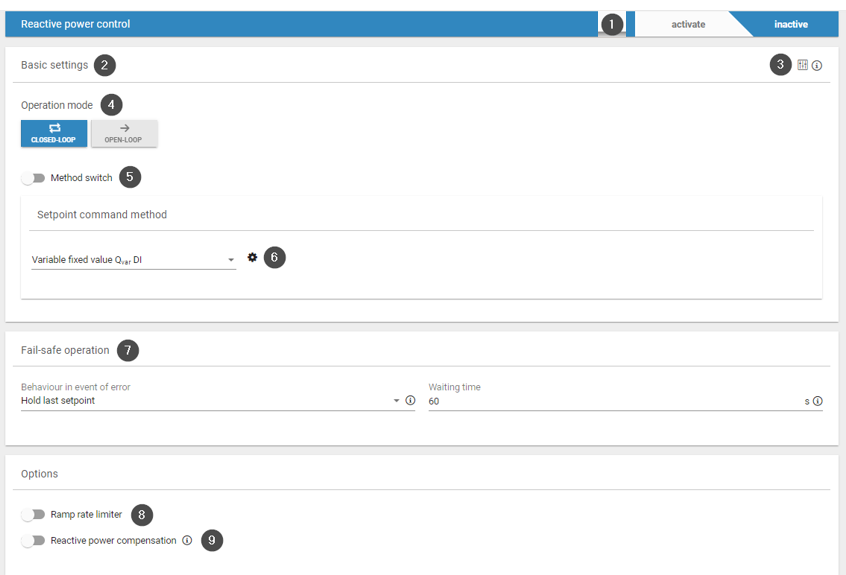
|
Item |
Name |
Details |
|---|---|---|
|
1 |
Reactive power control toggle |
Activate the toggle ONLY after you have fully configured your power control setup. |
|
2 |
Basic settings |
Select closed-loop or open-loop operation mode, and set a command method. |
|
3 |
Extended settings icon |
Extended controller parameters / reactive power control for PV system, including the controller sampling time (default value: 500 ms). |
|
4 |
Operation mode |
|
|
5 |
Method switch |
Toggle activated: Choose a method switch via digital input or via Modbus and enter additional parameters. Toggle deactivated: Use the setpoint command method |
|
6 |
Gear icon |
Select relevant parameters from the dropdown for the setpoint command method and enter the values via the |
|
7 |
Fail-safe operation |
Configure fail-safe behavior in case of communication loss. See Fallback behavior. |
|
8 |
Ramp rate limiter |
Configure ramp rate limiter. See Ramp rate limiter. |
|
9 |
Reactive power compensation |
Configure reactive power compensation. |
