.svg)
Last modified:
About calculated data points
Grid operators, plant operators, energy traders, or balancing service providers often want to know the potential available production of a PV plant in real-time. You can use the calculated data points in blue’Log for this.
Prerequisites
-
Master or standalone mode
The following values can be read via the Modbus interfaces Modbus power control and Remote Power Control:
-
Available active power
-
Available reactive power
-
Number of active inverters
-
Number of installed inverters
To configure the values, navigate to Power Control > Operating data > Calculated data points.
Available active power
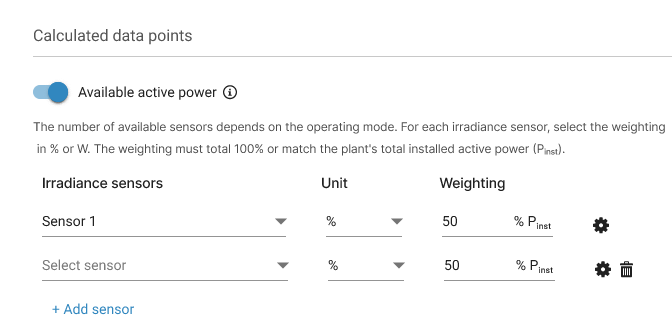
The available active power Pavailable is a theoretical calculation of what can be produced by the PV plant based on the current weather conditions and irradiance. Depending on your requirements, you can configure the parameters of the calculation.
-
Select up to 5 irradiance sensors for the calculation of Pavailable . When adding more than 1 sensor, you must give each a weighting factor.
For each irradiance sensor, you can set an inclination angle and include a temperature coefficient.
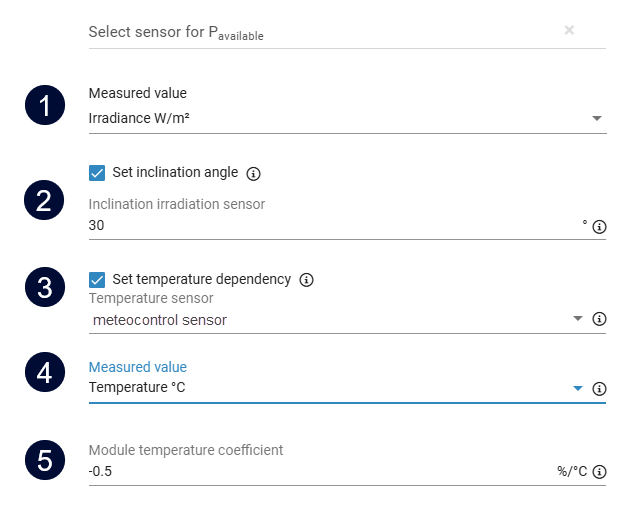
|
Item |
Designation |
Description |
|---|---|---|
|
1 |
Measured value |
If a device offers several values, select the measured value of the sensor. |
|
2 |
Inclination of irradiance sensor |
If the irradiance sensor is not mounted on the module plane, correct its inclination angle here. The correction is applied as follows: Irradiance in module plane = Measured irradiance/cos(Inclination) |
|
3 |
Temperature sensor |
Assign the module temperature sensor that corresponds to this irradiance sensor. |
|
4 |
Measured value |
See item 1 |
|
5 |
Module temperature coefficient |
The temperature coefficient of the PV module indicates the loss of performance measured in W per °C (reference: 25°C). Refer to the PV module datasheet for this value. |
Formula: Available active power
The available active power is the sum of the calculations of each irradiance sensor. For each sensor i, the following formula is used:
Pavailable,i= Pinst * weighti * Gm,i / 1000 * [1/cos(inclinationi * (pi/180))] * [1+ (TemperatureCoefficienti /100)*(ModuleTemperaturei-25) ]
-
Pinst in W: Installed active power: sum of the nominal power of the installed power generating units (inverters). Configure this value under Plant data > Extended plant data/rating data.
-
Gm in W/m2: Irradiance in module plane.
-
If this theoretical calculated value is above the real maximum power of the PV inverters, the value Pavailable will be limited up to Pmax, AC.
Note
VCOM users ONLY To explore more complex methods of calculating the theoretical available power, see the topic Simulation in the VCOM Cloud documentation.
Available reactive power
Grid operators want to know a plant’s reactive power capability to estimate its contribution to voltage stability. The available reactive power is the calculation of the potential reactive power that can be produced by the PV plant, taking into account the capabilities of the inverters and the current production.
For the calculation of Qavailable, you must define the following parameters:
|
Parameter |
Description |
Where to define? |
|---|---|---|
|
Smax |
Maximum apparent power of the power-generating system |
Power control > Operating data > Plant data > Extended plant data/rating data |
|
cos φmax |
(Maximum) power factor of inverter |
Power control > Operating data > Calculated data points > Available reactive power |
Formula: Maximum active power Pmax, cos φmax
Pmax, cos φmax = Smax * cos φmax
Formula: Maximum reactive power Qmax:
Qmax = sqrt( S²max - P²max, cos φmax ) = sqrt( S²max * (1 - (cos φmax)² ))
Formula: Available reactive power Qavailable:
This depends on the value Psum,inv which is the sum of the inverter active power.
-
if Psum,inv < Pmax, cos φmax: → Qavailable = Qmax
-
if Psum,inv >= Pmax, cos φmax: → Qavailable = sqrt( S²max- P²sum,inv )
Example
A PV plant consisting of one inverter, where:
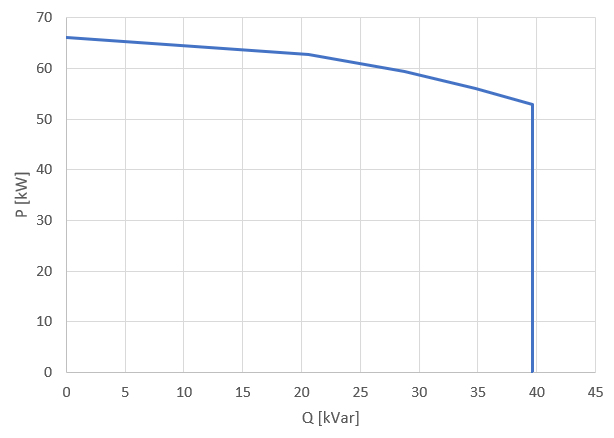
Smax = 66kVA and cos φmax = 0.8.
The resulting available reactive power is shown as a function of the active power output in the graph below. For example, if the inverter is producing 30kW, it can potentially deliver 39 kVar of reactive power (available reactive power).
Number of installed inverters
-
Sum of all connected inverters.
-
No configuration necessary.
-
If the blue'Log XC is configured as a master, the number of inverters connected to slaves will also be considered.
Number of active inverters
-
An inverter is "active" once a threshold of current or power is exceeded.
-
You can configure this threshold under Power Control > Operating data > Calculated data points > Number of active inverters.
-
If the blue'Log XC is configured as a master, the number of inverters connected to slaves will also be considered.