.svg)
Last modified:
System availability is the percentage of a system that is available over a period of time. It is an indicator of how quickly faults are identified and remedied.
System availability overview
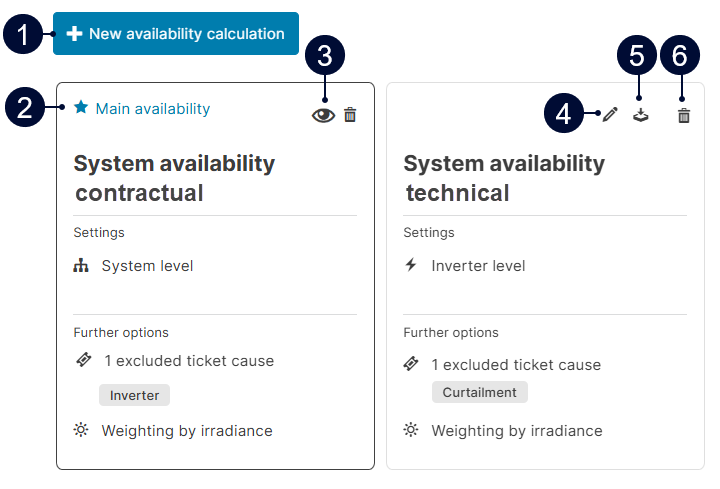
|
Name |
Description |
|
|---|---|---|
|
1 |
|
Create a new system availability formula. |
|
2 |
|
Main system availability used in charts and reports. |
|
3 |
|
The formula is read-only if the user is not the creator. |
|
4 |
|
Edit calculation parameters. |
|
5 |
|
Export calculation parameters and data for a specific date as an Excel spreadsheet |
|
6 |
|
Delete system availability formula. |


Default system availability formula
Expand to view formula
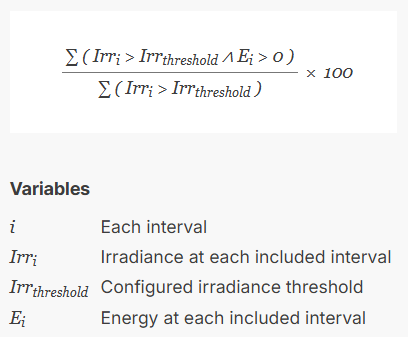
The following availability formula is used by default:
System availability parameters
You can adjust the following parameters to your needs in the formula.
These settings affect the Availability chart in the Section: System KPIs and the Availability chart in the Section: Inverters.
Configure a new system availability
Prerequisites
-
You are a premium partner or have purchased the KPI Editor module.
-
User group operations or higher
Steps
-
Go to


-
Select

-
Select

-
Edit the parameters to meet your requirements. See System availability parameters.
-
Select Save.
The system availability is configured. The formula on the right side of the window will update based on the new settings.
Example: User-defined system availability configuration
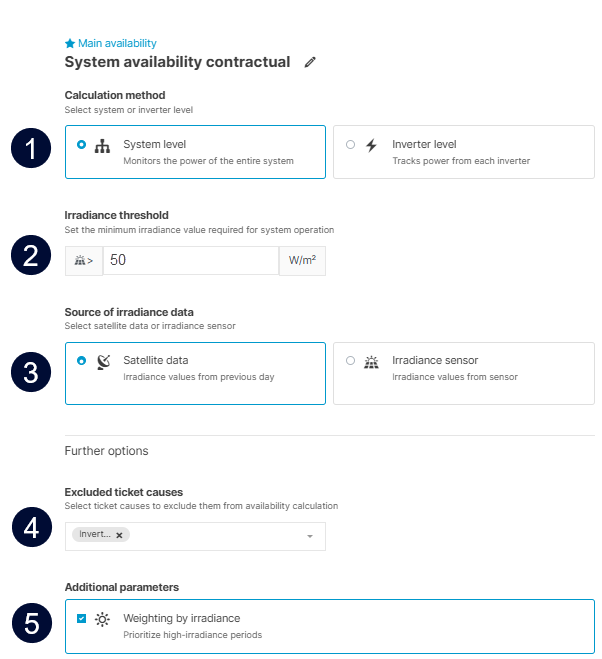
The user-defined system availability in the screenshot below is based on the contractual requirements of a specific system.
(1) Calculation method: System level. Calculated for the entire system, meaning the main system availability formula used.
(2) Irradiance threshold: 50 W/m2.
(3) Source of irradiance data: Satellite data. The interval related to the ticket “Inverter” is excluded from the calculation.
(4) Excluded ticket causes: Tickets with the Inverter ticket cause are excluded from the calculation.
(5) Weighting by irradiance: More weight is applied to intervals with higher irradiance levels.
Troubleshooting: KPI not available
Missing KPIs are usually caused by missing data, outages, or low irradiance. Check your data sources and alarms.
To help identify root causes, you can 