VCOM Cloud

KPI Editor: PR/Performance ratio

Last modified:

The performance ratio is calculated based on the actual generated energy (= system yield), installed DC power, and POAI/Plane-of-array irradiance. It indicates how well the PV system can convert solar energy. Typically, an annual PR value of 75-85% is considered good.

Performance ratio overview
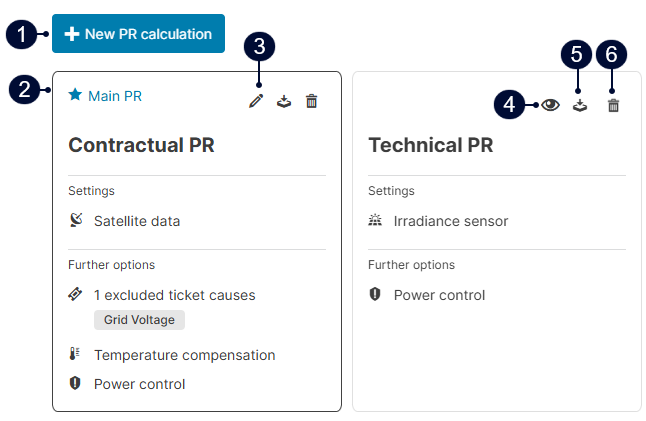
Performance ratio overview

Name

Description

1

icon-plus2.png New PR calculation

Create a new PR formula.

2

icon-star-full2.png Main PR

Main PR used in charts and reports.

3

icon-pencil1.png Edit

Edit calculation parameters.

4

icon-eye1.png View

The formula is read-only if the user is not the creator.

5

icon-download1.png Export calculation

Export calculation parameters and data as an Excel spreadsheet

6

icon-bin1.png Delete

Delete PR formula.

PR formula with all parameters activated

The PR formula from IEC 61724-1 is used. You can adjust the parameters to meet your requirements:

Expand to view formula
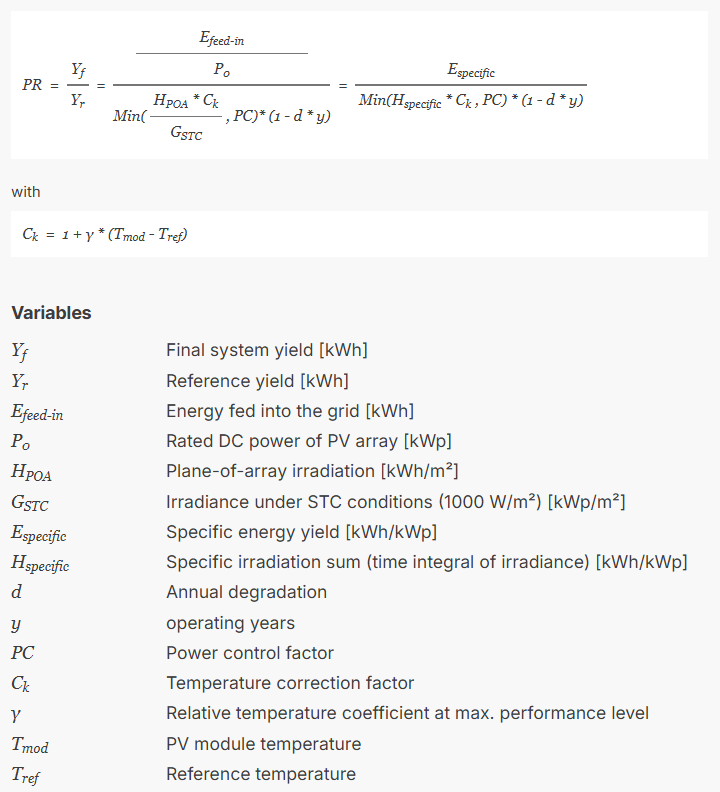
Default PR formula based on IEC 61724-1

PR parameters

The table below describes the parameters of the PR formula:

Expand to view explanation of PR parameters

Parameter

Variable

Description

Source of data for Efeed-in

Efeed-in

This must be a term with the unit kWh representing energy fed into the grid.

Source of data for HPOA

HPOA

Select a source of irradiance:

  • A sensor that is defined as a term with the unit W/m² for irradiance at the module plane. See Terms.

  • Satellite data

Scope of data


Interval during which the PR is calculated. We recommend Irradiance as threshold to exclude irrelevant intervals, as this works better on cloudier days.

Aggregation of data


Select the aggregation method that defines how daily values are weighted in the monthly PR:

  • Based on IEC (default): Calculated from total monthly sums of energy and irradiance.

  • Adjust for energy produced: Days with higher energy yield have more influence on the monthly PR.

  • Adjust for irradiance: Days with higher irradiance have more influence on the monthly PR.

Excluded ticket causes


Choose intervals you want to exclude from the calculation. See Exclude tickets from KPI calculations.

Temperature compensation

Ck

γ

Tmod

Tref

  • Enter a Temperature coefficient.

  • Under Source of data for Tmod: Select the data source for the PV module temperature. The temperature source must be defined as a term with the unit °C for module temperature. See Terms.

  • Source of data for Tref: Choose a reference temperature:

    • TSTC 25° C: Default: Based on standard test conditions for modules.

    • Single value: Based on a single temperature.

    • Monthly distribution: Based on varying monthly temperatures.

    • Sensor: Based on values from a temperature sensor.

Degradation

d

Add the annual degradation rate of your modules. This can be the same rate as for the Yield forecast or a different rate.

Power control

PC

Correct the PR for periods when the system is curtailed by adjusting the expected energy accordingly. Select the source of power control/curtailment:

  • Correction value: Use the technical value calculated by the PPC and sent to the inverters.

  • Setpoint value: Use the external setpoint from the grid operator or energy trader.

Configure a new PR

Prerequisites
  • You are a premium partner or have purchased the KPI Editor module.

    • User group operations or higher

  • Terms are set up for the following: feed-in energy, irradiance, and temperature.

  • VCOM receives power control signals.

Steps
  1. Go to icon-wrench1.png System settings > icon-stats-growth.png Calculations > Performance ratio.

  2. Select icon-plus2.png New PR calculation.

  3. Select icon-pencil1.png Edit next to New PR calculation and give your calculation a name.

  4. Edit the parameters to meet your requirements. See PR parameters.

  5. Select Save.

The performance ratio is configured. The formula on the right side of the window will update based on the new settings.

Example: User-defined PR configuration

This user-defined PR example is based on the contractual requirements of a specific system.

  1. Uses the default term E_Z_EVU for feed-in energy

  2. Uses satellite data.

  3. Only considers data between 8 AM and 8:55 PM.

  4. Data aggregation is adjusted for energy: days with higher energy yield have more influence on the monthly PR.

  5. The interval related to the ticket “Grid voltage” is excluded from the calculation.

  6. Temperature changes are taken into account using the default coefficient 0 and the default term for module temperature, T_M0. The reference temperature is the STC standard of 25°.

  7. The active power correction value PPC_P_SET_CTRL_REL is factored into the calculation.
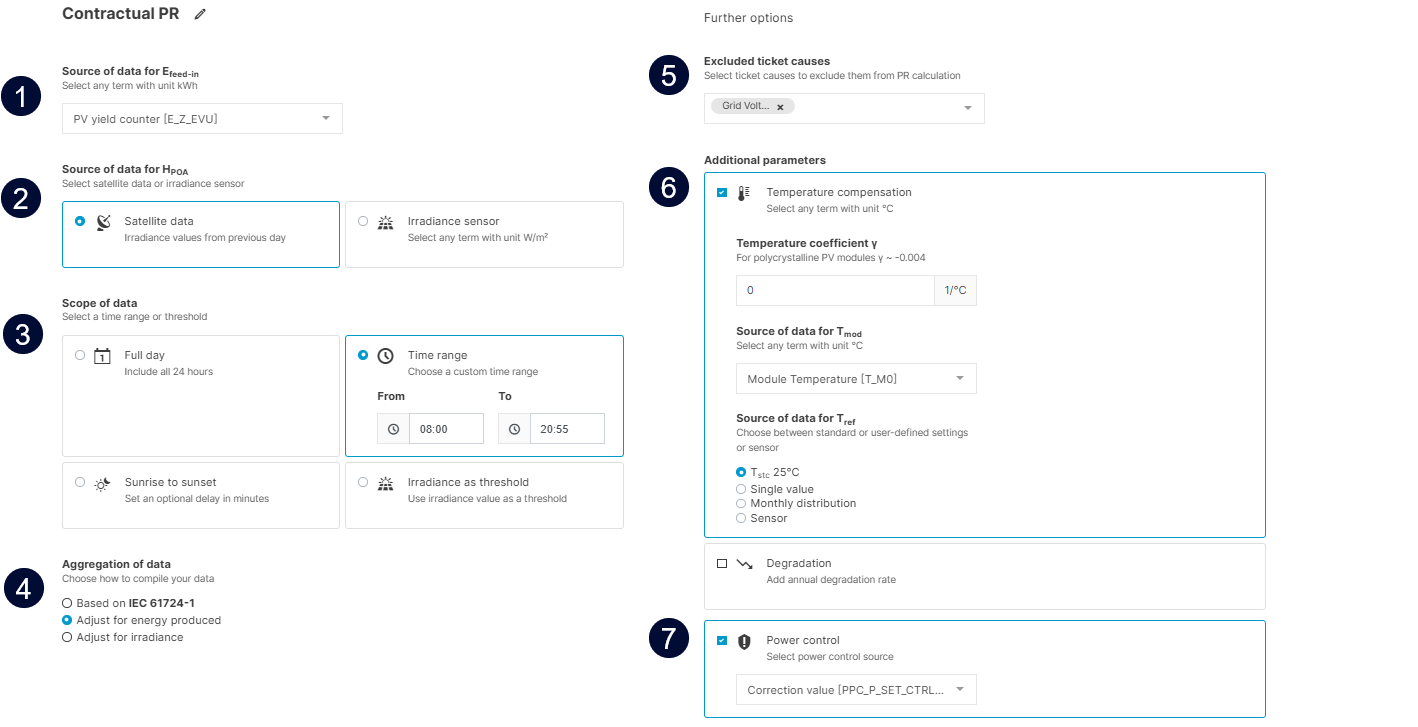
image-20260623-123633.png
Example: User-defined PR configuration


PR chart thresholds

You can define the thresholds for different performance levels (displayed as green, yellow, and red) that are reflected in the PR/Performance ratio chart and PR/Performance ratio – comparison chart:

  • Portfolio-wide for every system: At the Portfolio-level , go to icon-cog1(1).png Portfolio settings > icon-cogs1.png Customization > Design > Chart thresholds.

  • System-specific for each system separately: At the system-level , go to icon-wrench1.png System settings > icon-stats-growth.png Calculations > Performance Ratio > PR chart thresholds.

Troubleshooting: PR not available

Missing KPIs are usually caused by missing data, outages, or low irradiance. Check your data sources and alarms.

To help identify root causes, you can icon-download1.png Download a CSV file to view the raw data used for the PR calculation (daily aggregation). The same root causes will affect system availability as well.