
Last modified:
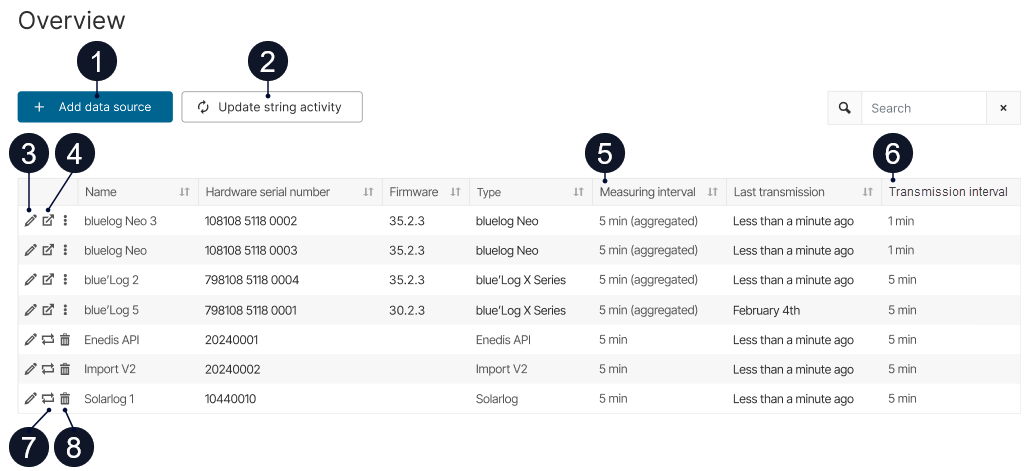
The data sources overview lists all data sources configured for a system and provides information about their status and configuration.
Find the data sources overview at SYSTEM LEVEL , under 

|
Item |
Description |
|
|---|---|---|
|
1 |
+ Add data source |
Set up a new data source. See Adding a data source to import data into VCOM. |
|
2 |
Update string activity |
See Automatically update the activity status for string inverter input strings. |
|
3 |
|
Edit a data source’s configuration. |
|
4 |
|
BLUELOG ONLY Opens the web interface for bluelog Neo or blue’Log XM/XC configurations. |
|
5 |
Measuring interval |
Displays the measuring interval that is configured during data source setup. See Measuring interval. |
|
6 |
Transmission interval |
Displays the transmission interval that is calculated by the portal. See Transmission interval. Note The interval is not available until 3 days after the data source has been set up. |
|
7 |
|
Replace a data source. See Replacing or deleting a data source. |
|
8 |
|
Delete a data source. See Replacing or deleting a data source. |


