.svg)
Last modified:
Note
The content on this page refers only to the blue'Log XC combined with the Hybrid EMS licence.
About method switch
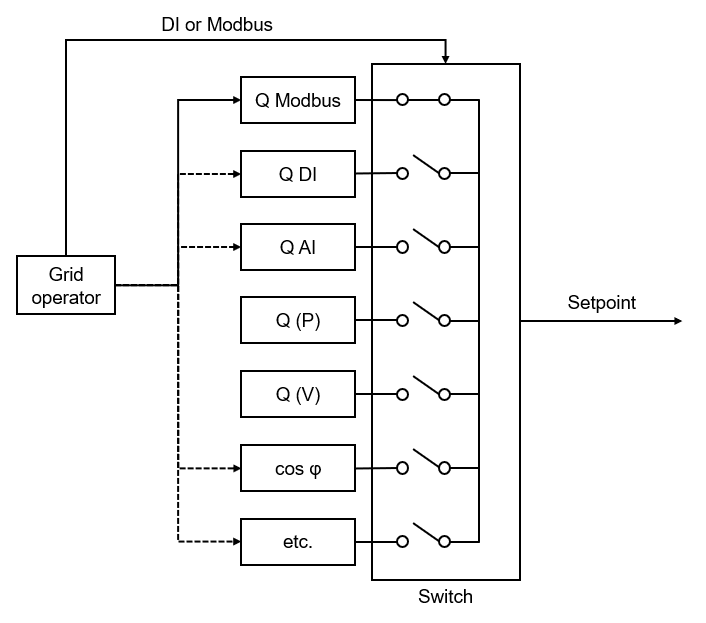
If a grid operator requires more than one control mode for reactive power, a mechanism to switch between two or more modes is needed. This is called a method switch.
To switch between two or more control modes, the grid operator sends a command, for example, “enable/disable characteristic curve control”. The grid operator may also require an acknowledgment (feedback signal) of the command. The blue’Log requires a permanent valid switching command. If the power plant controller (blue’Log XC) does not detect a valid switching command, it switches to fail-safe operation (fallback behavior) after a defined waiting time.
On the blue’Log XC, you can configure a method switch for reactive power control. You can do this using a digital input (dry contact) or Modbus (network-based method).
Configure a method switch via digital input
If the method switch is activated via a digital input, you physically wire a control signal to the device. The signal tells the device to switch its operation mode.
Prerequisites
-
blue’Log XC with Hybrid EMS license
-
Power control is activated
Steps
-
Navigate to Power control > Reactive power > Activate the Method switch toggle.
-
New fields will appear. Select Method switch via digital input (DI) and configure the following optional items.
-
Pulse group: Here, you can specify whether the inputs are switched as pulses or permanently. You can find this information in the manufacturer's documentation of the device.
-
Input (command): Specify the inputs required for control. By default, all digital inputs are listed. If you need fewer inputs, remove them using the

-
Acknowledgment: Some grid operators require an acknowledgment of the input signals. For this, activate the Acknowledgment toggle. By default, the acknowledgments are output at the digital outputs of the blue'Log. Advanced configuration options are available for this.
-
-
Basic method (default method): The controller uses this method until the blue’Log receives the control signal. See Fail-safe operation (Q). Select a method and configure it via the

-
Select the

Configure a method switch via Modbus
If the method switch is controlled via Modbus, the blue’Log listens for the setpoint command method from the controller or computer to decide how to operate. For the relevant registers (write values), see the Modbus Power Control Interface registers.
Prerequisites
-
blue’Log XC
-
Power control is activated
-
Modbus Power Control license is installed
Steps
-
Navigate to Power control > Reactive power > Activate the Method switch toggle.
-
New fields will appear. Select Method switch via Modbus
-
Select Information about the interface to view the transmission parameters for the Modbus TCP server.
-
Select the desired method. Further configurations are required depending on the method you select.
-
Select the

Notes
-
A method can be selected only once.
-
If the setpoint command method is not received via Modbus, the blue’Log will switch to fail-safe operation.