Last modified:
Note: Beta feature
Telecontrol is currently available as a beta feature
About diagnostics and test
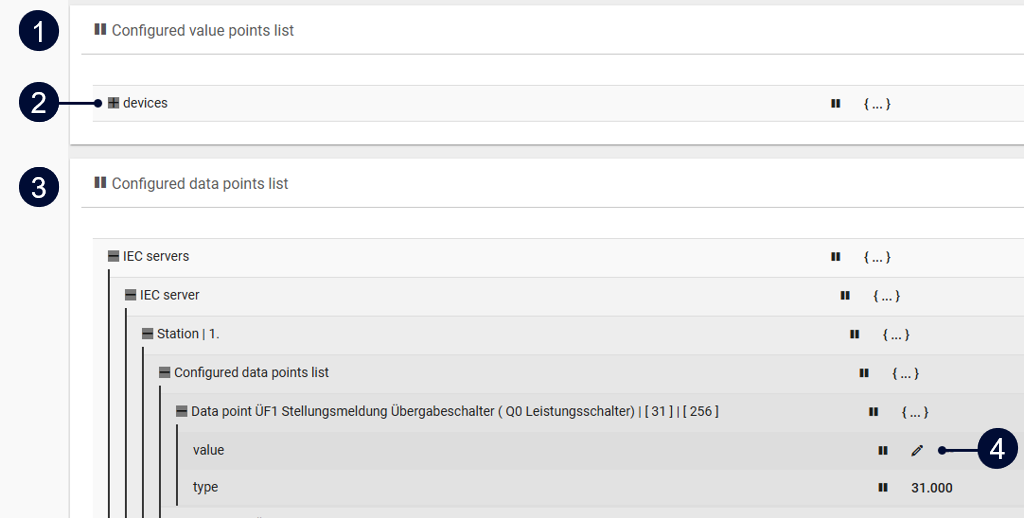
Under Telecontrol > Diagnostics and test, you can temporarily modify configured data points and value points to test and troubleshoot telecontrol settings and plant behavior. This lets you simulate communication remotely before going live, without, for example, physically disconnecting inverters.
VCOM USERS VCOM does not receive test mode data. Therefore, test values and the test mode status are not available in VCOM.
|
Name |
Description |
|
|---|---|---|
|
1 |
Configured value points list |
All value points that are configured for Telecontrol transmission:
|
|
2 |
|
View all items in a list. |
|
3 |
Configured data points list |
All configured data points that the grid operator receives from your plant. |
|
4 |
|
Temporarily edit a value. |


Further actions
Expand to view details
-

-

-

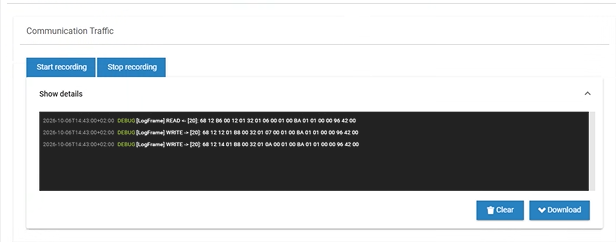
Check communication traffic
Use the Communication traffic feature to check how well communication is working between the bluelog and the grid operator.
Steps
-
Go to Communication traffic.
-
Select Start recording.
-
The log window displays the raw byte data of what is happening on the IEC interface.
-
Select Stop recording to stop displaying the log data. Otherwise, the recording will stop when you exit the test page.
Further actions
-
Download: Download the log file as a JSON.
-
Clear: Clear data from the window.