bluelog Neo

Cockpit

Last modified:

The Cockpit is the default landing page when you log into the bluelog Neo web interface. It gives you a quick overview of the actual power being read by the device, the number and type of connected devices, and an overview of the system settings.
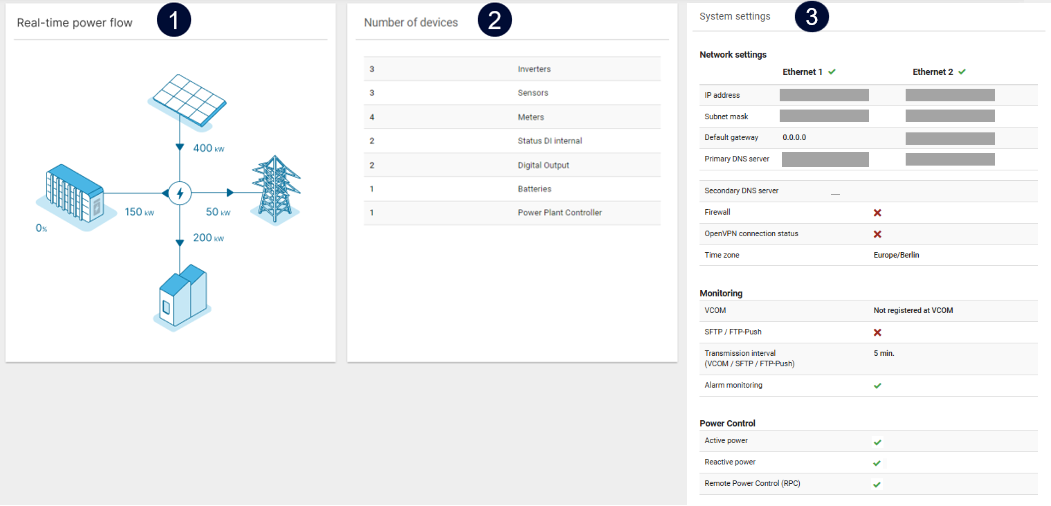
Cockpit example
Cockpit: example

Name

Details

1

Power flow

  • Diagram of how power is flowing through your system in real time.

  • Depending on the plant type, different elements (grid, PV, battery, and load) are displayed.

  • If your plant has a battery system, the state of charge is displayed in the icon and as a number.

  • If a measurement is zero or in case of an error, the connecting lines will be displayed as dotted.

Prerequisites

  • A Control license is activated

  • A meter is selected

  • The type of plant is selected.

2

Number of devices

Number and type of configured devices.

3

System settings

Overall system settings.