.svg)
Note
This product has been discontinued and is no longer maintained.

If the data transfer to the VCOM portal no longer works, please check the following points:
-
First, determine how the data logger transmits its data (DSL / cellular, possibly still analog or ISDN).
-
Check the correctness of the settings in the following menu items on the web interface of the WEB'log under Admin Monitoring -> Network:
-
Settings (DSL/Mobilfunk)
-
Internet (Analog/ISDN)
-
Mailbox (Mailbox -> aktiv)
-
-
Check the cabling of the communication path (Ethernet, antenna, or PSTN cabling)
-
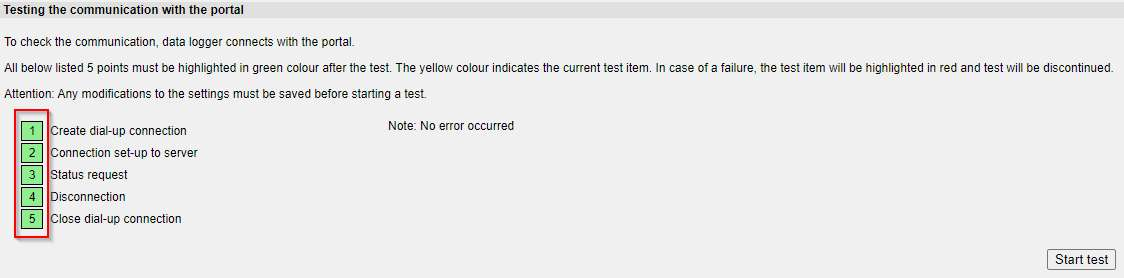
If the previous points have been checked, you can start a communication test under Admin Monitoring -> Network -> Mailbox (below).
When all 5 communication phases have turned green, the data transfer works:
-
If the data is to be transmitted via DSL / mobile radio, the network configuration of the WEB'log must also be stored in the VCOM portal.
VCOM -> System configuration -> WEB'log -> System data